Table of Content
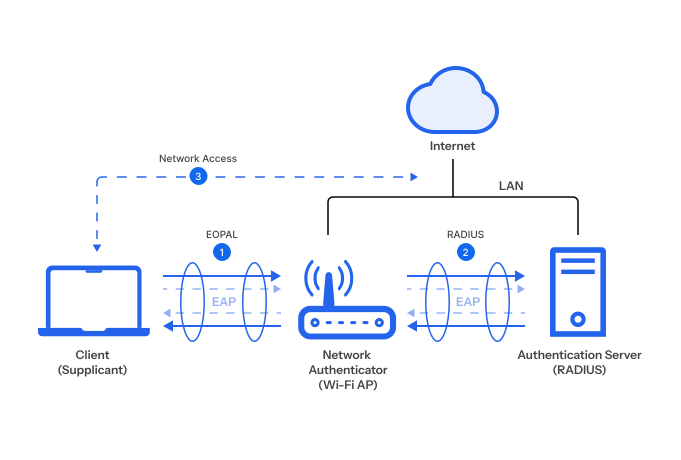
Table of Content
Here is a scenario that plays out in enterprises every week.
An employee is working from a coffee shop. Their laptop automatically connects to a wireless access point whose SSID matches the office network name — “CorpWiFi”. A fake RADIUS server behind the rogue wireless access point accepts the EAP request. The employee’s laptop, configured for PEAP-MSCHAPv2 authentcation and set to trust any server certificate, completes the handshake. The attacker silently collects a valid Active Directory username and password.
The employee notices nothing. They open their laptop an hour later, the battery is fine, the VPN is connected, email is loading. The credential was harvested without a single error message.
This attack is not sophisticated. It requires a laptop, a USB wireless adapter, and two open-source tools. It works specifically because password-based EAP methods transmit a human-known secret — and human-known secrets can be intercepted.
EAP-TLS eliminates the attack entirely. There is no password. There is no secret for the attacker to capture. The only credential is a cryptographic private key that never leaves the device’s hardware. There is nothing to harvest.
This guide covers everything you need to understand EAP-TLS, deploy it correctly, and automate it at scale using BastionXP CA and RADIUS.
What You’ll Learn
- What EAP-TLS is and why it is the only Wi-Fi authentication method that fully satisfies Zero Trust
- How the EAP-TLS handshake works, step by step
- The PKI requirements — what certificates you need and how key storage affects security
- How to deploy EAP-TLS: PKI setup, RADIUS configuration, MDM certificate delivery, AP configuration
- How to deliver certificates via SCEP, Dynamic SCEP, and ACME Device Attestation
- How BastionXP automates the full certificate lifecycle — issuance, renewal, revocation
- A troubleshooting reference for the most common EAP-TLS failure modes
- Where EAP-TLS fits in your Zero Trust architecture
A home Wi-Fi router handles authentication itself — it checks the pre-shared password and grants access. Every device uses the same secret, and the only way to revoke one device is to change the password for everyone.
Enterprise networks need per-device identity. But the access point — the hardware mounted on the ceiling — is a radio relay, not an authentication engine. Asking it to maintain thousands of credentials and enforce access policies is the wrong tool for the job.
A RADIUS server (Remote Authentication Dial-In User Service) handles this instead. When a device connects to a WPA2-Enterprise SSID, the AP relays the authentication request to the RADIUS server. RADIUS validates the credential, applies policy, and returns a verdict — allow or deny. The AP just enforces it.
A RADIUS server can be configured to perform username/password based authentication (using PAP, LDAP or Active Directory) or certificate based authentication using EAP-TLS.
Device (Supplicant) ←— EAP —→ Access Point (Relay) ←— RADIUS —→ RADIUS Server (Decision)
The device never talks to RADIUS directly. The AP never evaluates the credential. One RADIUS server can serve thousands of APs across every office — policy changes (new VLANs, revoked certificates, new device groups) are made once and apply everywhere immediately.
EAP-TLS is the protocol that runs inside this relay — it defines what credential the device presents to RADIUS, and how both sides verify each other before any network access is granted.
1. What Is EAP-TLS? (And Why It Is the Gold Standard for Wi-Fi Authentication)
EAP (Extensible Authentication Protocol) is a framework — a container for authentication methods, not an authentication method itself. It runs over 802.1X, the port-based network access control standard that WPA2-Enterprise and WPA3-Enterprise use to gate Wi-Fi access. Inside the EAP container, the specific method determines what credential is presented and how it is verified.
EAP-TLS is one such method. The word “TLS” means — the device and the RADIUS server perform a full Transport Layer Security handshake to authenticate each other. This is the same cryptographic foundation that secures HTTPS, mTLS, and modern API communication. EAP-TLS applies it to Wi-Fi authentication.
The defining property of EAP-TLS is mutual authentication: both the device and the RADIUS server must present certificates, signed by a trusted Certificate Authority, before either side trusts the other. No other EAP method does this.
- In PEAP-MSCHAPv2, only the server presents a certificate. The device presents a password.
- In EAP-TTLS, only the server presents a certificate. The device presents a password inside the tunnel.
- In EAP-TLS, both present certificates. There is no password on either side.
This mutual requirement is what makes EAP-TLS structurally immune to the Evil Twin attack. A rogue access point cannot obtain a certificate signed by your private CA. When the device checks the RADIUS server’s certificate against its trusted CA root and finds a mismatch — or no certificate at all — it refuses to connect. The attack dies before a single byte of the inner authentication is attempted.
2. EAP-TLS vs Other EAP Methods — Why It Wins on Every Security Dimension
Understanding where EAP-TLS sits in the landscape of EAP methods is essential for making the case internally and for designing the right split-SSID policy for mixed device fleets.
EAP-TLS vs PEAP-MSCHAPv2: The Evil Twin Problem
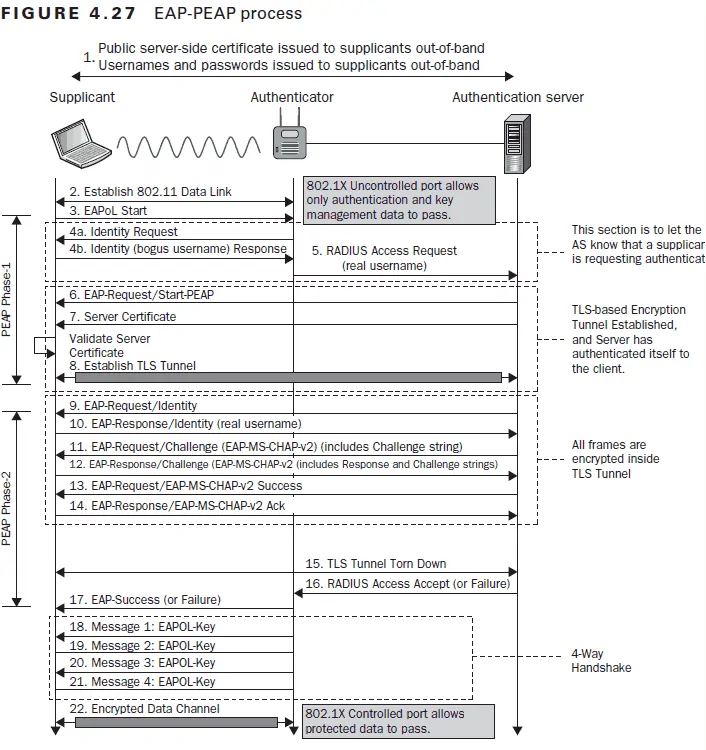
PEAP (Protected EAP) wraps the credential exchange in a TLS tunnel — hence “protected.” But the protection is one-directional: only the server presents a certificate. The device presents a username and password as the inner authentication method.
The critical weakness: most OS supplicants do not validate the RADIUS server’s certificate by default. A rogue AP presents any certificate; the supplicant accepts it; the MSCHAPv2 exchange proceeds inside the fake tunnel. The attacker captures the NTHash from that exchange and can crack it offline or use it directly in a pass-the-hash attack.
Even when server certificate validation is enforced in MDM profiles, PEAP-MSCHAPv2 still carries a password — a human-memorized, directory-stored secret that can be phished, sprayed, or stolen in a data breach. EAP-TLS has no equivalent exposure because there is no password anywhere in the protocol.
EAP-TLS vs EAP-TTLS
EAP-TTLS builds the same one-directional TLS tunnel as PEAP but allows the inner authentication protocol to be PAP, CHAP, or MSCHAPv2 — more flexible for non-Active Directory identity stores. The security properties are similar to PEAP: one-directional trust, password at the core, same Evil Twin exposure if server certificate validation is not enforced.
EAP-TLS vs PEAP-GTC (Token-Based)
PEAP-GTC sends a one-time password or push MFA token as the inner method. It adds a second factor, which meaningfully reduces credential replay risk. But it still relies on a password-adjacent secret, still requires user interaction at every reconnection, and still does not verify the device — only the user. EAP-TLS verifies the device cryptographically, not the person.
EAP Protocol Comparison Table
| Feature | EAP-TLS | PEAP-MSCHAPv2 | EAP-TTLS | PEAP-GTC |
|---|---|---|---|---|
| Credential type | Device certificate | Username + password | Username + password | OTP / push token |
| Client certificate required | Yes | No | No | No |
| Server certificate required | Yes | Yes (often not validated) | Yes (often not validated) | Yes |
| Mutual authentication | Yes | No | No | No |
| PKI / CA required | Yes | No | No | No |
| Phishing resistance | Yes | No | No | Partial |
| Evil Twin protection | Yes | No | No | No |
| Hardware key binding possible | Yes (Secure Enclave / TPM) | N/A | N/A | N/A |
| User experience | Invisible — fully automated | Password prompt | Password prompt | MFA prompt |
| Affected by AD password rotation | No | Yes | Yes | Yes |
| Zero Trust compatible | Yes | No | No | No |
| Best for | Corporate managed devices | Environments without PKI | Non-AD identity stores | MFA-required BYOD |
The pattern is consistent: EAP-TLS is the only method where every security dimension is closed. For a full discussion of how this applies to WPA2-Enterprise deployment decisions, see our WPA2-Enterprise guide.
3. How EAP-TLS Works — The Protocol Handshake Step by Step
Most guides describe EAP-TLS at a conceptual level. This section traces every step of the actual protocol exchange — because understanding the mechanics is what lets you configure it correctly, diagnose failures precisely, and explain to stakeholders exactly why it is secure.
Below are the images from the Certified Wireless Security Professional Study Guide detailing the step-by-step procedure for EAP-TLS Authentication - RFC 5216.
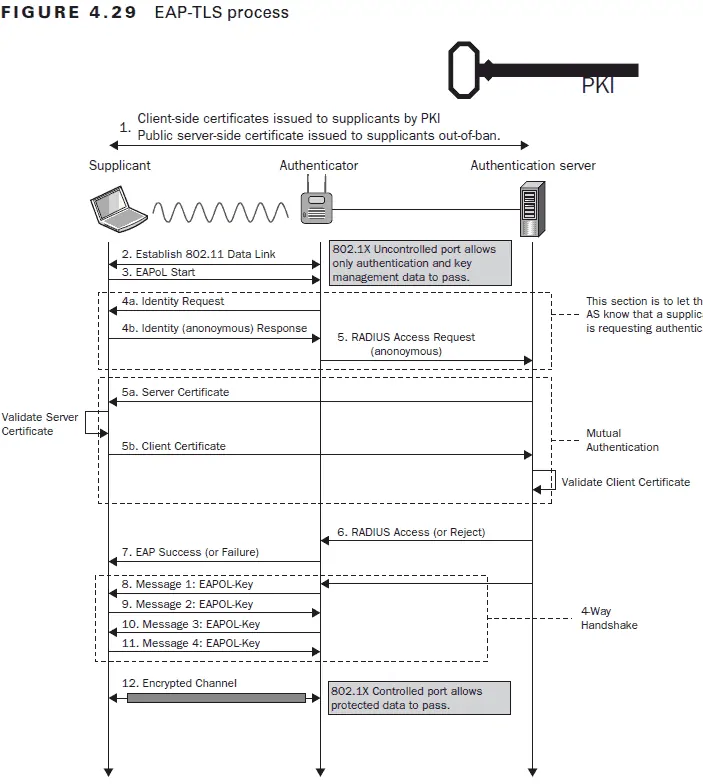
Step 1 — Device Associates with the SSID. The device connects to the WPA2-Enterprise SSID. The access point places the device in an unauthenticated 802.1X state — the port is open only for EAP messages. No DHCP, no DNS, no traffic.
Step 2 — EAP-Request/Identity. The AP sends an EAP-Request/Identity to the device. The device responds with its identity — typically the certificate subject CN or an anonymous outer identity for privacy. This identity is used for RADIUS routing, not for authentication.
Step 3 — TLS ClientHello. The device initiates the TLS handshake by sending a ClientHello — its supported TLS versions, cipher suites, and a random nonce.
Step 4 — ServerHello and RADIUS Server Certificate. The RADIUS server responds with a ServerHello, selects the cipher suite, and presents its server certificate — signed by your organization’s CA.
Step 5 — Device Validates the Server Certificate. The device checks the RADIUS server’s certificate against the trusted CA root configured in its MDM Wi-Fi profile. If the certificate was not issued by that specific CA — a rogue AP presenting a self-signed or third-party certificate — the device terminates the handshake immediately. The Evil Twin attack ends here, at Step 5, before any device credential is ever transmitted.
Step 6 — Server Requests the Client Certificate. If the server certificate passes validation, the RADIUS server sends a CertificateRequest — it requires the device to prove its identity as well.
Step 7 — Device Transmits Its Client Certificate. The device sends its client certificate — issued by the same CA, delivered to the device via SCEP or ACME through MDM. The private key corresponding to this certificate stays in the device’s keystore (or Secure Enclave / TPM). It is used to sign the handshake — but it never leaves the hardware.
Step 8 — RADIUS Server Validates the Client Certificate. The RADIUS server validates the client certificate chain: is it signed by the trusted CA? Has it expired? Has it been revoked (CRL / OCSP check)? Does it match a policy — correct OU, correct SAN, required certificate attributes? If any check fails, the handshake is rejected with an Access-Reject.
Step 9 — TLS Handshake Complete. Both sides have verified each other. Session keys are derived from the exchange. An encrypted EAP tunnel is established for the remainder of the session.
Step 10 — RADIUS Access-Accept. The RADIUS server sends an Access-Accept to the AP, optionally including VLAN assignment attributes and other policy attributes derived from the client certificate’s contents.
Step 11 — AP Opens the 802.1X Port. The authenticator (AP) opens the port. The device receives a DHCP lease, resolves DNS, and is on the network. From the user’s perspective: the Wi-Fi icon appeared. Nothing else happened.
4. The PKI Requirements for EAP-TLS — What You Need Before You Start
The most common reason organizations avoid EAP-TLS is the assumption that “it requires PKI” — meaning months of infrastructure work before a single device connects. This section addresses that assumption directly.
What Certificates You Actually Need
An EAP-TLS deployment requires exactly three types of certificates:
1. CA Root Certificate The trust anchor. Installed on every client device (via MDM profile) and imported into the RADIUS server. This is the certificate both sides use to validate each other’s identity. You need one — and with BastionXP, it is created in minutes.
2. RADIUS Server Certificate Issued by your CA, installed on the RADIUS server. Presented to every connecting device in Step 4 of the handshake. Must have a Server Authentication EKU. BastionXP generates and installs this automatically when you configure the built-in RADIUS.
3. Client Device Certificates One per device, issued by your CA, delivered via MDM. Each certificate uniquely identifies the device. The private key is generated on the device and never transmitted. This is the credential that proves device identity in Step 7.
That is the complete list. No intermediate CA is strictly required for a simple deployment, though BastionXP creates a root + intermediate hierarchy by default for better operational hygiene.
Private CA vs Public CA for EAP-TLS
EAP-TLS requires a private CA. Public commercial CAs (DigiCert, Sectigo, Let’s Encrypt) cannot issue client authentication certificates to your internal devices — their policies prohibit it, and their roots are not the right trust anchor for an internal PKI anyway.
Your options:
- Microsoft ADCS (on-premise): The traditional enterprise choice. Works well but requires Windows Server infrastructure, NDES for SCEP delivery, and significant ongoing maintenance. Appropriate if you are already heavily invested in Microsoft PKI. If you are evaluating moving away from NDES, see replacing Microsoft NDES with a cloud-native SCEP gateway.
- BastionXP CA (cloud-native): No Windows Server, no NDES, no infrastructure to manage. Run a private CA and ACME server in the cloud with a SCEP and ACME endpoint ready immediately. For organizations moving away from on-premise infrastructure, this eliminates the primary EAP-TLS deployment barrier.
Certificate Validity and Rotation Strategy
Long-lived certificates (1–2 years): Common in SCEP-based deployments because manual renewal is too burdensome to do frequently. Creates a large window of exposure — a stolen or cloned certificate remains valid for up to two years.
Short-lived certificates (hours to days via ACME): The operationally superior choice when automation handles renewal. BastionXP issues certificates with configurable short lifespans — 7 days or 30 days — and the ACME client on the device renews them automatically before expiry.
Key Storage: Software Keystore vs Hardware Secure Enclave / TPM
Where the private key lives determines the maximum security of the EAP-TLS credential.
Software keystore (default for SCEP): The private key is generated and stored in the OS software keystore. It is protected by OS access controls, but it can in principle be extracted by someone with elevated access or a sophisticated attack on a compromised device. SCEP-enrolled certificates are software-stored by default.
Hardware-bound (Secure Enclave / TPM via ACME device-attest-01): The private key is generated inside the device’s Secure Enclave (Apple) or TPM (Windows) and never leaves the hardware — not during enrollment, not during use, not ever. Even physical access to the device cannot extract the key. This is the strongest possible EAP-TLS credential, and it is what ACME Device Attestation delivers.
For corporate-owned Apple and modern Windows devices, hardware-bound keys via ACME should be the default. For mixed or legacy fleets, SCEP-issued software-stored certificates are still a major improvement over passwords.
5. How to Deploy EAP-TLS — A Step-by-Step Architecture Guide
Step 1: Define the Authentication Strategy
Before touching any infrastructure, answer four questions:
Which devices use EAP-TLS? Corporate-managed devices (Intune or Jamf enrolled) should always use EAP-TLS. For BYOD devices, a separate SSID with PEAP and restricted VLAN access is a practical compromise — one SSID for corporate EAP-TLS, one for BYOD with limited network access. BastionXP RADIUS enforces the segmentation at authentication time.
Which certificate delivery method? SCEP for universal MDM compatibility, Dynamic SCEP for improved enrollment security without OS requirements, ACME Device Attestation for hardware-bound keys on iOS 16+, macOS 13+, and Windows with TPM. Many organizations run all three simultaneously from the same BastionXP CA.
Which MDM? Intune, Jamf, Workspace ONE, and Kandji all support SCEP and Wi-Fi payloads. Intune and Jamf also support ACME payloads for Apple devices. BastionXP generates ready-to-import profiles for each.
What is the VLAN segmentation policy? Map certificate attributes (OU, SAN, device type) to VLANs. Corporate devices → corporate VLAN. BYOD → guest VLAN. IoT → isolated segment. Define this policy before configuring RADIUS.
Step 2: Build the PKI with BastionXP CA
- Log in to the BastionXP portal → Certificate Authority → Create CA
- Configure the CA subject (organization, country), key algorithm (RSA 4096 or EC P-384), and validity period
- Enable the SCEP endpoint — BastionXP generates a unique SCEP URL for your organization
- Enable the ACME endpoint for Apple and Windows devices requiring hardware attestation
- Configure certificate templates: subject format (
CN={{DeviceName}}), SAN (device serial number, user UPN), key usage (Client Authentication), validity period - Export the CA root certificate — you will distribute this to devices via MDM and it will be automatically trusted by the BastionXP RADIUS
Step 3: Configure RADIUS for EAP-TLS
With BastionXP, the RADIUS server is part of the same platform as the CA. Steps that require manual configuration in FreeRADIUS or NPS are pre-configured automatically:
- Navigate to RADIUS → Configuration in the BastionXP portal
- Set EAP-TLS as the allowed EAP method (PEAP can be disabled entirely for corporate SSIDs)
- The BastionXP RADIUS server certificate is automatically issued by the BastionXP CA — no manual certificate install
- The CA root is automatically trusted for client certificate validation — no manual import
- Configure authorization policies: VLAN assignment by certificate OU or SAN, revocation checking (CRL and OCSP enabled by default)
- Add your access points as RADIUS clients: enter each AP’s IP address and define the shared secret
Step 4: Deliver Certificates to Devices via MDM
In your MDM, create two linked profiles and push them to all device groups:
Certificate profile (SCEP):
- SCEP server URL: your BastionXP SCEP endpoint
- Subject:
CN={{DeviceName}}orCN={{UserPrincipalName}} - Subject Alternative Name: device serial number or UPN
- Key usage: Digital Signature, Key Encipherment
- Extended key usage: Client Authentication
Wi-Fi profile:
- SSID: your corporate wireless network name
- Security type: WPA2-Enterprise (or WPA3-Enterprise)
- EAP method: EAP-TLS
- Client certificate: reference the certificate profile above
- Trusted RADIUS server certificate: import the BastionXP CA root — specify this CA specifically, not “any trusted CA”
- RADIUS server name: your RADIUS server or BastionXP Cloud RADIUS server hostname (for server identity validation)
device-attest-01 hardware attestation during enrollment.Step 5: Configure the Wireless Infrastructure
On each access point or wireless controller:
- Set the SSID security to WPA2-Enterprise
- Authentication server: BastionXP RADIUS IP, port 1812
- Shared secret: the value configured in Step 3
- Enable 802.1X port-based access control
- Configure VLAN IDs to match the RADIUS policy assignments
Test with a single enrolled device before fleet-wide profile deployment. Verify in the BastionXP RADIUS logs that the EAP-TLS handshake completes with an Access-Accept and the correct VLAN assignment.
6. Delivering EAP-TLS Certificates to Devices — SCEP, Dynamic SCEP, and ACME
Getting certificates onto devices is the operational core of an EAP-TLS deployment. Three methods are available, each with different security properties and MDM support. For a detailed comparison of all three, see the SCEP gateway and certificate distribution guide.
SCEP: The Universal Starting Point
SCEP (Simple Certificate Enrollment Protocol) is supported natively by every major MDM and every major OS. It is the fastest path from zero PKI to working EAP-TLS.
The MDM pushes a SCEP configuration profile containing the BastionXP SCEP endpoint URL and a challenge password. The device generates a key pair, sends a CSR and the challenge password to BastionXP, and receives a signed certificate. The certificate is installed in the device’s keystore and immediately usable for EAP-TLS.
Security consideration: The challenge password in classic SCEP is a static shared secret — any device that obtains it can enroll. Mitigate this with short-lived challenge passwords and IP allowlisting. For higher assurance, move to Dynamic SCEP or ACME.
Dynamic SCEP: Per-Device Tokens Without Changing the Device
Dynamic SCEP replaces the static challenge password with a per-device, single-use token generated by the MDM at enrollment time. The token is tied to a specific device identity in the MDM inventory — a different device cannot consume it, and it expires within minutes.
Dynamic SCEP meaningfully tightens enrollment security without requiring any change to the device OS. It is supported by Microsoft Intune and Jamf Pro in conjunction with the BastionXP challenge token API.
The enrolled certificate is still software-stored — Dynamic SCEP improves enrollment integrity but does not change key storage.
ACME Device Attestation: Hardware-Bound Identity for Apple and Windows
ACME with the device-attest-01 challenge is the strongest certificate delivery method available for EAP-TLS. During enrollment, the device’s Secure Enclave (Apple) or TPM (Windows) generates the private key in hardware, produces a cryptographic attestation statement proving the device’s identity and integrity, and sends this attestation to BastionXP CA for validation.
BastionXP validates the attestation against Apple’s attestation roots (or the relevant TPM root). If the device is jailbroken, running a disallowed OS version, or presenting a fabricated attestation, enrollment fails immediately. If attestation succeeds, BastionXP issues a certificate bound to that specific hardware.
The resulting EAP-TLS credential has properties that no SCEP-enrolled certificate can match:
- The private key is hardware-generated and non-exportable
- The device’s hardware identity and integrity are cryptographically verified at enrollment
- BastionXP can require re-attestation at every certificate renewal — continuous device integrity verification, not just a one-time enrollment check
For the full walkthrough of ACME Device Attestation on iOS and iPadOS, see ACME certificate enrollment for iOS devices. For the Wi-Fi and VPN use case end to end, see securing corporate Wi-Fi and VPN with ACME Device Attestation. For a complete product overview of how BastionXP implements this, see the ACME Device Attestation solution page.
7. How BastionXP Automates EAP-TLS Certificate Lifecycle Management
The operational argument against EAP-TLS has historically been certificate lifecycle management: issuing, tracking, renewing, and revoking certificates across hundreds or thousands of devices is expensive work that scales linearly with fleet size. BastionXP automates every step.
Issuance
SCEP and ACME endpoints issue certificates automatically during MDM enrollment. No administrator approval is required per device. When a new MacBook is enrolled in Jamf, it receives its EAP-TLS certificate before the user logs in for the first time — without an IT ticket, without a help desk call, without manual intervention.
Renewal
For ACME-enrolled devices: The OS ACME client (native on iOS 16+, macOS 13+) automatically initiates certificate renewal before expiry. The renewal triggers a fresh device-attest-01 attestation — BastionXP re-verifies the device’s hardware integrity before issuing the new certificate. A device that has been jailbroken or compromised since the last renewal fails attestation and loses Wi-Fi access automatically.
For SCEP-enrolled devices: The MDM initiates certificate renewal based on the validity period configured in the SCEP profile. BastionXP issues the new certificate; the MDM installs it on the device. The user experiences no interruption.
In both cases, the process is entirely background. No user action, no help desk involvement, no “certificate expiring soon” warnings.
Revocation
When a device is lost, stolen, or decommissioned, an administrator marks its certificate as revoked in the BastionXP portal. Within seconds, the certificate is added to the Certificate Revocation List and flagged via OCSP. The next time that device attempts an EAP-TLS handshake — to the Wi-Fi, to a VPN, to any resource protected by a BastionXP-trusting RADIUS — Step 8 of the handshake fails. The device is rejected. No password reset required, no race against time, no dependency on the device being online to push a revocation command.
RADIUS Integration
Because BastionXP CA and RADIUS are the same platform, newly issued certificates are trusted by RADIUS immediately — there is no synchronization delay, no manual CA root import, and no risk of RADIUS rejecting valid certificates because the trust store has not been updated.
Audit and Visibility
Every certificate lifecycle event is logged: issuance (with device identity, MDM enrollment timestamp, and attestation result), renewal (with re-attestation result), revocation (with administrator identity and timestamp), and every RADIUS authentication (Access-Accept or Access-Reject, with the certificate CN, VLAN assigned, and AP identifier). This audit trail satisfies the logging requirements of SOC 2, ISO 27001, HIPAA, and PCI DSS without additional tooling.
For the complete picture of how ACME automation transforms certificate lifecycle economics, see the full ACME automation guide and the ROI of switching from SCEP to ACME Device Attestation.
8. Troubleshooting Common EAP-TLS Deployment Issues
EAP-TLS failures are almost always certificate configuration problems, not protocol problems. The handshake is well-defined; when it fails, the failure reason is logged precisely. This table maps the most common symptoms to their root causes and fixes.
| Symptom | Likely Cause | Fix |
|---|---|---|
| Device connects to SSID but never receives an IP address | RADIUS is rejecting the client certificate | Check BastionXP RADIUS logs for the Access-Reject reason — usually expired cert, untrusted CA, or revoked cert |
| “Cannot connect to network” or “Authentication failed” on device | Client certificate not installed, or RADIUS server cert not trusted | Verify certificate is installed (Keychain/certlm.msc/Settings); confirm CA root is in the Wi-Fi profile trust anchor |
| Device connects fine on first boot, fails the next day | Short-lived certificate expired and ACME renewal failed | Check ACME client logs; ensure device can reach BastionXP ACME endpoint; verify MDM profile is not blocking ACME |
| Works on macOS, fails on Windows | CA root in User store instead of Computer store | Import CA root to the Computer (Local Machine) certificate store, not the Current User store |
| Works on iOS, fails on Android | SAN format mismatch or missing Wi-Fi profile field | Some Android versions require explicit SAN field format; check MDM Wi-Fi profile for the Android EAP-TLS configuration |
| RADIUS log shows “unknown CA” Access-Reject | CA root not imported to RADIUS trusted store | With BastionXP, this should not occur — if using external RADIUS, import the BastionXP CA root into its trusted CA store |
| Certificate installed but Wi-Fi profile shows “Not Connected” | Wi-Fi profile references wrong certificate identity or wrong SSID | Confirm the Wi-Fi profile’s certificate reference matches the installed certificate profile name in MDM |
| EAP-TLS works for one user, fails for another on same device | Per-user certificate issued instead of per-device certificate | For EAP-TLS Wi-Fi, use machine/device certificates, not user certificates — adjust the SCEP profile subject format |
| RADIUS accepts the cert but device lands in wrong VLAN | VLAN policy attribute mismatch | Check the certificate’s OU or SAN fields against the VLAN policy rules in BastionXP RADIUS |
| Certificate renewed but old cert still being presented | MDM did not push updated profile to device | Force a profile refresh in MDM; for ACME, verify the OS ACME client updated the keychain entry |
9. Where EAP-TLS Fits in Your Zero Trust Architecture
EAP-TLS is the network admission layer of a Zero Trust architecture for mobile devices. In the Zero Trust model — never trust, always verify — every access request must be evaluated against identity, device health, and context. EAP-TLS is how that principle is applied at the wireless network perimeter.
EAP-TLS and Device Identity
Zero Trust requires that the device, not just the user, is a verified identity signal. Passwords verify a person. EAP-TLS certificates verify a device — a specific, MDM-enrolled, CA-issued asset with a hardware-bound private key. A valid corporate certificate cannot be presented by a personal device, an unmanaged laptop, or an attacker’s machine, because those devices were never enrolled in the MDM and never issued a certificate by the CA.
EAP-TLS and Continuous Verification
With ACME-issued short-lived certificates renewed through BastionXP, device verification is continuous rather than one-time. Every certificate renewal is an opportunity to re-evaluate device posture. BastionXP can require fresh hardware attestation at every renewal cycle — a device that fails compliance (jailbroken, compromised, OS downgraded) fails renewal and loses network access without any administrator action.
EAP-TLS and mTLS — Complementary, Not Redundant
EAP-TLS and mutual TLS authentication serve adjacent but distinct purposes. EAP-TLS secures network admission — it determines whether a device gets onto the network at all. mTLS secures service-to-service communication inside the network — it authenticates API calls, microservice requests, and application connections. In a complete Zero Trust architecture, both are present: EAP-TLS at the network edge, mTLS at the application layer.
Compliance Alignment
EAP-TLS directly satisfies access control requirements across major compliance frameworks:
- SOC 2 (CC6.1, CC6.6): Logical access controls, network access restriction
- ISO 27001 (A.9.1.2): Access to networks and network services
- HIPAA (§164.312(a)(1)): Access control to electronic protected health information
- PCI DSS (Requirement 8): Identify and authenticate access to system components
The BastionXP audit log — every RADIUS authentication, every certificate issuance and revocation, every attestation result — provides the evidence trail these frameworks require.
10. EAP-TLS Frequently Asked Questions
What is the difference between EAP-TLS and PEAP?
EAP-TLS uses certificates on both sides — the device and the RADIUS server both present certificates and verify each other (mutual authentication). PEAP uses a certificate only on the server side; the device authenticates with a username and password inside the TLS tunnel. EAP-TLS is phishing-proof; PEAP is not.
Does EAP-TLS require a certificate on every device?
Yes — each device needs its own client certificate, delivered via MDM (SCEP or ACME). This is what makes EAP-TLS per-device rather than per-user. The certificate distribution process is automated through your MDM; no manual certificate handling is required.
Can I use EAP-TLS without an MDM?
Technically yes — certificates can be manually installed on devices. Practically, no — manual certificate management does not scale beyond a handful of devices. An MDM is the operational requirement for any EAP-TLS deployment at enterprise scale.
What happens when an EAP-TLS certificate expires?
With BastionXP and SCEP or ACME automation, nothing visible happens — the certificate is renewed automatically before expiry. Without automation, the device fails EAP-TLS authentication at the next connection attempt and requires manual certificate renewal to reconnect. This is why SCEP or ACME-based automated renewal is a hard operational requirement for short-lived certificate deployments.
Is EAP-TLS compatible with all access point vendors?
Yes. EAP-TLS is an 802.1X standard supported by all enterprise access point vendors — Cisco, Aruba, Meraki, Ruckus, Ubiquiti, Juniper Mist, and others. The AP configuration is identical regardless of vendor: point to BastionXP RADIUS at port 1812 with the shared secret and enable WPA2-Enterprise.
Can EAP-TLS be used for VPN as well as Wi-Fi?
Yes. EAP-TLS is the authentication method used in IKEv2 VPN (certificate-based), SSL/TLS VPN client authentication, and 802.1X wired network access, in addition to Wi-Fi. BastionXP-issued certificates can be used for Wi-Fi EAP-TLS and VPN client authentication simultaneously from the same CA.
What is the difference between EAP-TLS and mTLS?
EAP-TLS is a Wi-Fi (and wired 802.1X) network authentication protocol — it controls whether a device gets onto the network. mTLS (mutual TLS) is an application-layer protocol — it authenticates connections between services, APIs, and applications. Both use mutual certificate authentication; they operate at different layers of the stack and are complementary.
Does EAP-TLS work with Intune and Jamf?
Yes. Both Intune and Jamf support SCEP certificate profiles and Wi-Fi profiles with EAP-TLS. Both also support ACME payloads for Apple devices (iOS 16+, macOS 13+). BastionXP generates ready-to-import profiles for both platforms directly from the portal.
Final Thoughts: EAP-TLS Is Not a Complexity Tax — It Is a Complexity Elimination
The traditional argument against EAP-TLS has been operational: it requires PKI, and PKI is complex. NDES, Windows Server, certificate templates, manual renewal calendars, help desk tickets when certs expire — all of this was real, and it was a legitimate reason to stay on PEAP.
BastionXP eliminates all of it. A cloud-native CA with SCEP and ACME endpoints, a built-in RADIUS server pre-configured to trust its own CA, MDM profile generation for Intune and Jamf, short-lived certificates that renew automatically, and hardware-backed identity via ACME Device Attestation for Apple and Windows devices — the entire stack is one platform.
The result is an EAP-TLS deployment that is more secure than any password-based alternative, requires less operational effort to maintain than the PEAP deployment it replaces, and satisfies the Zero Trust security requirements that compliance frameworks and cyber insurance underwriters increasingly mandate.
EAP-TLS is not a 2010 technology that requires 2010-era infrastructure. With BastionXP, it is the simplest path to the most secure Wi-Fi authentication available.
Try BastionXP CA and RADIUS for free — or start with the ACME Server Guide or SCEP gateway guide if you want to understand the certificate delivery layer first.
About BastionXP
BastionXP is a cloud-native private PKI CA and device identity management platform that eliminates passwords and shared secrets by issuing hardware-attested certificates to mobile devices and laptops. Secure access to your Wi-Fi, VPN, and SaaS applications in your enterprise network. Replace legacy SCEP with automated ACME Device Attestation. No shared secrets. Zero credential theft. Learn more about BastionXP →