Table of Content
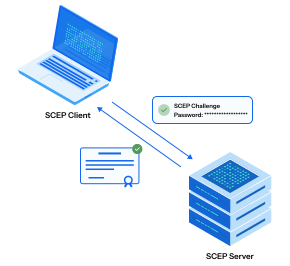
Table of Content
Your organization has 3000 managed devices. Every one of them needs a certificate to authenticate to your corporate Wi-Fi and VPN. Your Certificate Authority sits behind a firewall, inaccessible from the internet. Your IT team has three people.
Manual certificate distribution — generating, packaging, and deploying individual certificates to individual devices — is not a workflow. It is a full-time job that scales linearly with your device fleet, creates a six-month backlog before you have finished onboarding the first department, and collapses entirely the moment a certificate expires and nobody noticed.
This is the problem that SCEP — the Simple Certificate Enrollment Protocol — was designed to solve. And for two decades, it has solved it well enough that every major MDM platform on the planet supports it natively.
But the threat landscape has evolved. The assumption baked into SCEP — that a shared password is sufficient proof that an enrolling device is legitimate — no longer holds in an era of sophisticated credential attacks and Zero Trust mandates.
This guide covers the full spectrum: how SCEP gateways work today, what Dynamic SCEP fixes (and what it does not), what ACME Device Attestation makes possible, and how to use all three together in a phased migration that starts where your organization is today.
1. What Is SCEP — and Why It Became the MDM Standard
SCEP was originally developed by Cisco and VeriSign in the late 1990s to solve a specific problem: how do you get a certificate onto a network device — a router, a switch, a firewall — without a human being physically present to approve the request?
The answer was elegant for its time. The Certificate Authority generates a challenge password — a shared secret. Any device that presents this password along with a valid Certificate Signing Request (CSR) receives a signed certificate in return. The challenge password is the proof of authorization.
When mobile device management platforms emerged in the 2000s, SCEP became the natural fit for certificate delivery. It was already standardized, already supported by device operating systems, and already understood by PKI teams. Microsoft, Apple, Google, and every major MDM vendor built native SCEP support into their platforms.
Today, SCEP is supported natively by:
- Microsoft Intune (via NDES or a third-party SCEP proxy)
- Jamf Pro (via the built-in SCEP payload in configuration profiles)
- VMware Workspace ONE (via the SCEP payload in profiles)
- Kandji, Mosyle, and virtually every other MDM on the market
The installed base is enormous. If your organization uses MDM-delivered certificates today, there is a very high probability the underlying protocol is SCEP.
2. What Is a SCEP Gateway (and Why You Need One)
Your internal Certificate Authority — whether it is Microsoft Active Directory Certificate Services (ADCS), an on-premise CA, or a cloud CA like BastionXP — typically sits inside your network perimeter. It is not reachable from the internet by design, because direct CA exposure is a significant security risk.
But your MDM-managed devices need to reach the CA to request certificates. Remote employees are off-network. BYOD devices are off-network. Even corporate devices connecting to Wi-Fi for the first time have no certificate yet — which means they cannot authenticate to the very network they would need to use to reach the CA.
This is the problem a SCEP gateway solves.
The SCEP gateway sits between the device and the CA. It is internet-accessible (or reachable from the MDM), but it is not the CA itself. Its role is:
- Receive the enrollment request from the device (CSR + challenge password)
- Validate the challenge password against its policy
- Forward the CSR to the internal CA for signing
- Return the signed certificate to the device
The gateway acts as a Registration Authority (RA) — it authenticates the enrollment request, but the CA retains exclusive authority to sign certificates.
Microsoft NDES: The Classic Example
The most widely deployed SCEP gateway in enterprise environments is Microsoft NDES (Network Device Enrollment Service), a Windows Server role that proxies enrollment requests to an ADCS CA.
NDES works, but it comes with substantial operational overhead:
- Requires a dedicated Windows Server (or VM)
- Requires ADCS running on a separate server
- Requires an IIS web server, specific service account permissions, and manual certificate template configuration
- Requires on-premise infrastructure even if the rest of your stack is cloud-native
- Frequently breaks during Windows updates, requiring manual reconfiguration
For organizations that are already Windows-heavy, NDES is familiar. For organizations that have moved to cloud-first infrastructure, it is an expensive anachronism. For a complete breakdown of why NDES breaks and how to replace it, see replacing Microsoft NDES with a cloud-native SCEP gateway.
3. How SCEP Certificate Distribution Works — End to End
Understanding the protocol flow helps you configure it correctly, troubleshoot it when it breaks, and appreciate exactly where its security boundaries lie.
Here is what happens from the moment a new device is enrolled in MDM to the moment its certificate is installed and being used:
Step 1 — MDM pushes a SCEP configuration profile to the device. The profile contains the SCEP gateway URL, the challenge password, the desired certificate Subject (CN, SAN), the key size, and the certificate usage (e.g., Wi-Fi, VPN). The device receives this profile automatically during MDM enrollment.
Step 2 — The device generates a key pair locally. A 2048-bit or 4096-bit RSA key pair (or an EC key pair) is generated in the device’s software keystore. The private key stays on the device. The public key is packaged into a CSR.
Step 3 — The device sends the CSR and challenge password to the SCEP gateway. This is the enrollment request. The challenge password is how the device proves it has authorization to request a certificate.
Step 4 — The gateway validates the challenge password. If the password matches, the gateway considers the request authorized and forwards the CSR to the CA.
Step 5 — The CA signs the certificate and returns it. The CA checks the CSR, applies the configured certificate template (key usage, validity period, extensions), signs the certificate with its private key, and returns the signed certificate to the gateway.
Step 6 — The device installs the certificate. The signed certificate is installed in the device’s keychain or system certificate store, paired with the private key that was generated in Step 2.
Step 7 — The certificate is used for authentication. When the device connects to corporate Wi-Fi or VPN, it presents this certificate during the EAP-TLS handshake. The RADIUS server validates the certificate chain (trusting the CA that signed it) and grants access.
4. SCEP in Practice: MDM Integrations
Microsoft Intune + SCEP
Intune delivers SCEP certificates via a SCEP certificate profile (under Device Configuration → Profiles). The profile specifies:
- SCEP Server URL: Your BastionXP SCEP endpoint (e.g.,
https://ca.bastionxp.com/scep/your-org-id) - Subject name format: Typically
CN={{DeviceName}}orCN={{UserPrincipalName}} - Subject alternative name: Device serial number, UPN, or AAD Device ID as a SAN
- Certificate validity period: Configured on the BastionXP CA side
- Key storage provider: Software KSP (for standard SCEP) or TPM KSP (for hardware-backed keys on Windows)
- SCEP challenge: Retrieved from BastionXP’s admin portal
Intune distributes the profile to all targeted devices. Each device performs the SCEP enrollment independently, in the background, without user interaction.
Jamf Pro + SCEP
Jamf Pro delivers SCEP certificates via the SCEP payload inside a Configuration Profile (Computers → Configuration Profiles or Devices → Configuration Profiles for mobile).
Key fields:
- URL: Your BastionXP SCEP endpoint
- Name / Subject: CN field for the issued certificate
- Challenge: The challenge password from BastionXP
- Key size: 2048 or 4096 bit (for RSA)
- Use as digital signature / key encipherment: Checked for Wi-Fi and VPN use
Jamf allows you to include device-specific variables (like $SERIALNUMBER or $UDID) in the Subject or SAN fields, ensuring each enrolled certificate carries a unique device identifier — important for per-device RADIUS authorization policies.
Workspace ONE and Other MDMs
All major MDMs expose essentially the same SCEP payload fields under different UI labels. The core configuration is always:
- SCEP gateway URL
- Challenge password (static or dynamic)
- Subject / SAN format
- Key size and usage
BastionXP’s SCEP endpoint is MDM-agnostic. Any MDM that supports standard SCEP (RFC 8894) can point to it.
5. Configuring BastionXP CA as Your SCEP Gateway
Prerequisites: A BastionXP account, an MDM with devices already enrolled, and a RADIUS server configured for EAP-TLS (or use BastionXP’s built-in RADIUS).
Step 1 — Create a Certificate Authority in BastionXP. Log in to the BastionXP portal. Navigate to Certificate Authority → Create CA. Configure the CA name, subject (organization, country), key algorithm, and root certificate validity period. BastionXP generates the CA root and intermediate certificates automatically.
Step 2 — Enable the SCEP endpoint. Under the CA settings, enable the SCEP protocol. BastionXP generates a unique SCEP URL for your organization. Configure the challenge password policy: static password, or Dynamic SCEP (per-device token — covered in Section 6). Set the certificate validity period for issued device certificates.
Step 3 — Build the SCEP payload in your MDM. In Intune, Jamf, or your MDM of choice, create a new SCEP certificate profile. Enter the BastionXP SCEP URL and the challenge password (or configure the dynamic challenge integration). Set the Subject format to include device-identifying attributes.
Step 4 — Push the profile to devices. Assign the profile to your device groups in MDM and deploy. Each device will perform the SCEP enrollment automatically. In Jamf, you can scope to specific smart groups. In Intune, assign to AAD device groups.
Step 5 — Verify certificate installation.
On macOS: Keychain Access → System → Certificates. Look for a certificate issued by your BastionXP CA.
On iOS: Settings → General → VPN & Device Management → [profile name] → More Details.
On Windows: certlm.msc → Personal → Certificates.
Step 6 — Configure RADIUS to trust BastionXP CA. Export the BastionXP CA root certificate from the portal. Import it into your RADIUS server’s trusted CA store. Configure EAP-TLS to require client certificates issued by this CA. From this point, only devices that have enrolled through BastionXP can authenticate to your Wi-Fi and VPN.
6. What Is Dynamic SCEP
Classic SCEP uses a static challenge password — one string, shared across every device enrollment in your organization. This creates an obvious problem: if the password leaks (a disgruntled employee, a misconfigured profile visible in MDM logs, a support ticket screenshot), any device can enroll. There is no way to distinguish a legitimate corporate device from a personal laptop that obtained the password.
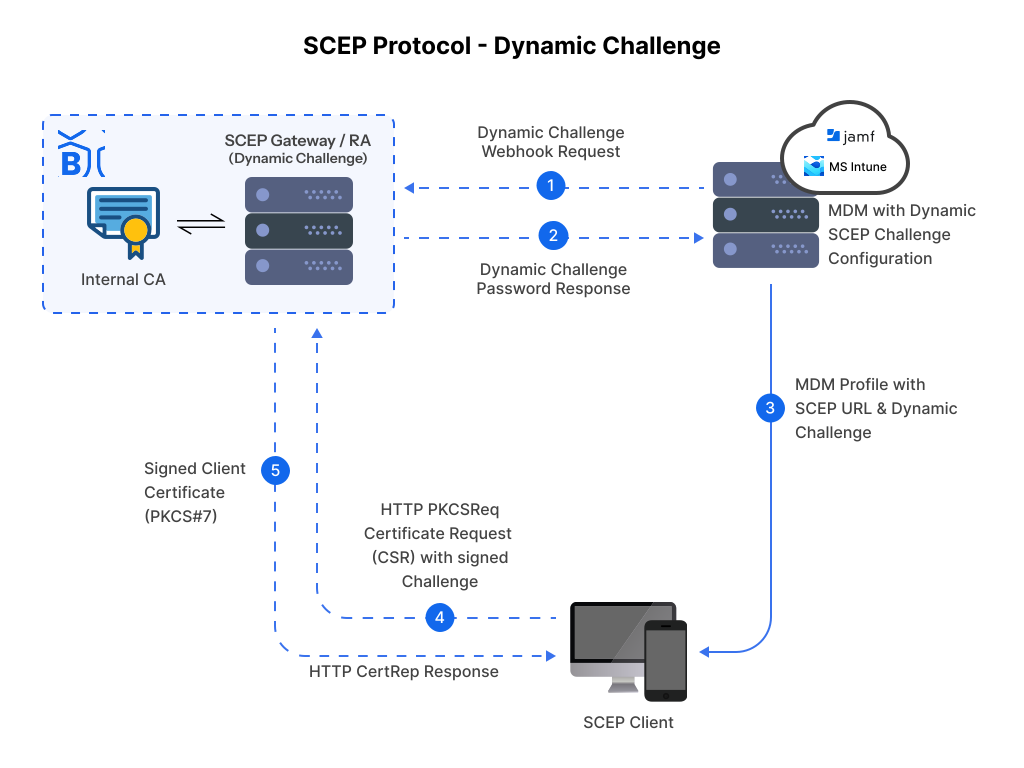
Dynamic SCEP solves this by replacing the static shared secret with a per-device, single-use challenge token.
Here is how it works:
- When a device needs to enroll, the MDM requests a unique challenge token from the SCEP gateway on behalf of that specific device.
- The gateway generates a token tied to that device’s identity (typically its MDM device ID or serial number). This token is valid only once and expires within a short window (minutes to hours).
- The MDM delivers this device-specific token to the device via the SCEP configuration profile.
- The device uses this token when it sends its CSR to the gateway.
- The gateway validates that the token matches the expected device identity — a different device cannot consume the same token.
The security improvement is meaningful. Even if the token is somehow intercepted, it is useless for enrolling any other device, and it expires before an attacker could act on it.
Which MDMs support Dynamic SCEP?
- Microsoft Intune supports Dynamic SCEP natively via its SCEP protocol integration. BastionXP provides a dynamic challenge API that Intune calls during profile delivery.
- Jamf Pro supports dynamic challenge via Jamf’s built-in SCEP challenge generation, integrated with BastionXP’s API.
What Dynamic SCEP does not solve:
Dynamic SCEP meaningfully tightens enrollment security. However, two fundamental gaps remain:
- The enrolled key is still software-stored. A certificate issued via Dynamic SCEP sits in the device’s software keystore. It can, in principle, be extracted by someone with root access to the device.
- There is no hardware attestation. Dynamic SCEP verifies that the right MDM device record initiated the enrollment. It cannot cryptographically verify that the physical hardware initiating the enrollment is the genuine, untampered device. A sophisticated attacker who controls the device’s software environment could potentially impersonate the enrollment flow.
These are the gaps that ACME Device Attestation closes.
7. What Is Automated Certificate Management Environment (ACME)
ACME (RFC 8555) is an IETF-standardized protocol for fully automated certificate lifecycle management. It was originally built to power Let’s Encrypt — the infrastructure that has automated TLS certificate issuance for hundreds of millions of web servers. In the enterprise context, ACME has been extended far beyond web servers into device identity, internal PKI, and Zero Trust network access.
Where SCEP relies on a shared secret as the proof of authorization, ACME relies on cryptographic proof of control — or, in the enterprise device context, cryptographic proof of hardware integrity.
The extension that makes this possible is device-attest-01, an ACME challenge type defined in the IETF draft for ACME Device Attestation. Here is what it enables:
How device-attest-01 Works
When a device requests a certificate via ACME with the device-attest-01 challenge:
- The ACME server (BastionXP CA) sends a challenge to the device.
- The device’s Secure Enclave (on Apple devices) or TPM (on Windows) generates an attestation statement — a cryptographically signed proof that contains:
- The device’s hardware identity (fused during manufacturing)
- The device’s current OS version and boot integrity status
- A public key for the certificate being requested
- The private key corresponding to this public key is generated inside the Secure Enclave and never leaves the hardware. Not during enrollment, not during renewal, not ever.
- BastionXP CA validates the attestation statement against Apple’s attestation roots (or the relevant TPM root). If the device is jailbroken, running an unapproved OS version, or presenting a fabricated attestation, the challenge fails immediately. No certificate is issued.
- If attestation succeeds, BastionXP issues a certificate bound to that specific hardware. The private key is hardware-protected and non-exportable.
Short-Lived Certificates and Automated Renewal
ACME is designed for certificate automation from the ground up. BastionXP uses this to issue short-lived certificates — valid for hours or a day rather than years — and renew them automatically in the background before expiry.
The ACME client on the device (the OS itself, on iOS 16+ and macOS 13+) initiates the renewal without user interaction or the MDM automatically pushes the configuration profile automatically (For eg: Jamf’s Automatic Redistribution) to the device to renew the certificate. For each renewal, BastionXP can require a fresh attestation, ensuring that the device’s continued integrity is verified at every renewal cycle — not just at initial enrollment.
MDM Support for ACME
Apple introduced native ACME payload support in iOS 16 and macOS 13. This means the same MDM configuration profile workflow you use for SCEP can be adapted for ACME — replacing the SCEP payload with an ACME payload that points to BastionXP’s ACME endpoint. For the full iOS walkthrough, see ACME certificate enrollment for iOS and iPadOS.
Microsoft Intune is expanding ACME support for Windows endpoints via TPM-backed enrollment.
Jamf, Fleet DM and others, when integrated with BastionXP, can support ACME for Apple endpoints.
8. ACME vs SCEP vs Dynamic SCEP: The Shift Toward Modern Certificate Management
With all three protocols on the table, the differences become clear. This is not a question of “which is best” in the abstract — it is a question of which is appropriate for your current environment, your device mix, and your security requirements.
ACME vs SCEP
| Dimension | SCEP | ACME (with device-attest-01) |
|---|---|---|
| Enrollment proof | Shared challenge password | Hardware cryptographic attestation |
| Key storage | Software keystore (exportable) | Secure Enclave / TPM (non-exportable) |
| Certificate lifespan | Long (1–2 years typical) | Short (hours to days, auto-renewed) |
| Phishing resistance | No — secret can be leaked or stolen | Yes — no human-known secret exists |
| Device hardware verification | None | Full — jailbroken devices fail attestation |
| Revocation complexity | High — long certs require active CRL/OCSP | Low — short expiry minimizes revocation need |
| Automation | MDM-delivered profile (semi-automated) | Fully automated ACME lifecycle |
| MDM support | Universal — all platforms | iOS 16+, macOS 13+, expanding |
Dynamic SCEP vs SCEP
| Dimension | Classic SCEP | Dynamic SCEP |
|---|---|---|
| Challenge password | Static, shared across all devices | Per-device, single-use token |
| Enrollment spoofing risk | High — any device with the password can enroll | Significantly reduced |
| Key storage | Software keystore | Software keystore (unchanged) |
| Hardware attestation | None | None |
| Complexity | Low | Moderate (requires gateway API integration) |
| MDM support | Universal | Intune, Jamf (others expanding) |
The Takeaway
Dynamic SCEP is a meaningful improvement over classic SCEP — it eliminates the shared-secret enrollment vulnerability without requiring any change to the device OS or hardware. It is the right upgrade for organizations that need better enrollment security today but cannot yet mandate iOS 16+ or ACME-capable hardware across the fleet.
ACME Device Attestation is the Zero Trust destination. It closes the two gaps Dynamic SCEP leaves open: software key exportability and the absence of hardware identity verification. For certificate-based authentication in high-security enterprise environments, it is the only protocol that delivers phishing-proof, hardware-rooted device identity at scale. See the BastionXP ACME Device Attestation solution page for a full overview of how BastionXP implements this for your device fleet.
The financial case for making this shift is substantial. Hardware-attested short-lived certificates materially reduce breach risk, eliminate help desk overhead from certificate management, and satisfy the increasingly stringent requirements of cyber insurance underwriters and compliance frameworks.
9. How Can Organizations Use SCEP and ACME Together?
This is not a forced migration. SCEP and ACME are not mutually exclusive. BastionXP CA speaks both protocols simultaneously from the same CA root — which means your RADIUS server trusts all certificates regardless of which protocol issued them.
When to Use SCEP
- Windows and Android devices (ACME device attestation not yet universally supported)
- Older Apple devices that cannot run iOS 16 or macOS 13
- Environments where Dynamic SCEP + per-device tokens already provide adequate enrollment security
- IoT and network devices that support SCEP but not ACME
When to Use ACME Device Attestation
- Corporate-owned Apple devices (iPhone, iPad, Mac with Apple Silicon)
- High-security segments: finance, legal, HR, executive devices
- Zero Trust Wi-Fi and VPN authentication where hardware-bound identity is required
- Environments replacing legacy SCEP infrastructure and targeting passwordless authentication
A Practical Phased Migration
Phase 1 — Deploy BastionXP SCEP gateway for all MDM-enrolled devices. Replace NDES (or your existing SCEP proxy) with BastionXP’s cloud-native SCEP endpoint. All existing device enrollments migrate immediately. No device changes required.
Phase 2 — Enable Dynamic SCEP for new enrollments. Configure BastionXP’s per-device challenge token API with Intune and Jamf. New device enrollments from this point use single-use tokens rather than a shared password. Existing enrolled devices are unaffected.
Phase 3 — Migrate Apple devices to ACME Device Attestation.
For corporate-owned iPhones, iPads, and Macs running iOS 16+/macOS 13+, replace the SCEP payload in MDM profiles with an ACME payload pointing to BastionXP’s ACME endpoint. Devices re-enroll via device-attest-01 on next profile refresh. Hardware-bound, short-lived certificates replace the software-stored SCEP certificates.
Phase 4 — Retire legacy SCEP as the fleet modernizes. As older non-Apple devices are refreshed and replaced, ACME coverage expands. SCEP remains available for any device that genuinely cannot support ACME, but its scope narrows to the edges of the fleet.
Throughout all four phases, BastionXP’s CA root remains unchanged. Your RADIUS server trusts the same CA. Your IT team manages one platform.
10. Automate Certificate Management With BastionXP
BastionXP CA was built specifically to eliminate the operational overhead that makes certificate management painful at scale — from the NDES dependency of classic SCEP through to the manual renewal cycles of long-lived certificates.
The core design principle: one platform, every protocol, zero manual intervention.
What BastionXP Provides
A cloud-native SCEP gateway. No Windows Server. No NDES. No on-premise infrastructure. Your MDM points to a BastionXP SCEP endpoint hosted in our cloud. Device enrollment works identically to NDES from the MDM and device perspective — without the operational maintenance.
Dynamic SCEP with per-device challenge tokens. BastionXP exposes a challenge token API that Intune and Jamf call during profile delivery. Each device receives a unique, time-limited token. The static shared password is eliminated from day one.
A full ACME server with device-attest-01 support. BastionXP validates attestation statements against Apple’s attestation roots and TPM vendor roots. Jailbroken devices fail enrollment. Hardware keys never leave the Secure Enclave. Certificates are short-lived and automatically renewed by the OS ACME client.
A built-in RADIUS server for EAP-TLS. BastionXP’s RADIUS handles 802.1X authentication for Wi-Fi and VPN directly. You configure your access points and VPN concentrators to point at BastionXP RADIUS — no separate FreeRADIUS or NPS required for most deployments.
MDM integrations. BastionXP works with Intune, Jamf Pro, Workspace ONE, and Fleet DM. Configuration profile templates for each MDM are available directly from the BastionXP portal.
Automated lifecycle management. Certificates are issued, renewed, and revoked without IT involvement. When a device is lost or stolen, an administrator revokes its certificate in the BastionXP portal — within seconds, that device is denied access at the next EAP-TLS handshake, regardless of what credentials it presents.
The Result
In a fleet of 1,000 devices, transitioning from manual SCEP management to BastionXP automation typically reduces certificate-related IT overhead from approximately 150 hours per year to under 5 hours per year — the difference between a dedicated task and an occasional review of the BastionXP dashboard.
The security posture improvement is categorical. A SCEP-enrolled device carries a software-stored, two-year certificate tied to a shared enrollment password. A BastionXP ACME-enrolled Apple device carries a hardware-bound, eight-hour (or twenty-four-hour or forty-eight-hour) certificate tied to cryptographic proof of its Secure Enclave. The attack surface comparison is not incremental — it is orders of magnitude different.
Conclusion
SCEP gateways have enabled scalable certificate distribution for over two decades, and they remain the most practical starting point for any organization deploying MDM-managed device certificates today. The protocol’s universal MDM support and straightforward operational model make it the right foundation.
Dynamic SCEP tightens the enrollment security model without requiring device OS upgrades — replacing the shared-password vulnerability with per-device, single-use challenge tokens. For organizations that need improved enrollment integrity immediately, it is the right next step.
ACME Device Attestation is the Zero Trust destination: hardware-rooted enrollment, non-exportable keys, short-lived certificates, and automated renewal. For Apple-heavy corporate fleets and security-sensitive environments, it delivers a fundamentally different category of device identity assurance.
BastionXP supports all three from a single platform — which means you can deploy SCEP today, enable Dynamic SCEP for new enrollments immediately, and migrate to ACME Device Attestation at the pace that your device fleet and compliance requirements demand. No rip-and-replace. No separate infrastructure for each protocol. One CA root, trusted by your RADIUS server, issuing certificates regardless of which enrollment path the device used.
Ready to eliminate NDES and automate your certificate lifecycle? Try BastionXP CA for free or read how ACME Device Attestation compares to SCEP in depth.
About BastionXP
BastionXP is a cloud-native private PKI CA and device identity management platform that eliminates passwords and shared secrets by issuing hardware-attested certificates to mobile devices and laptops. Secure access to your Wi-Fi, VPN, and SaaS applications in your enterprise network. Replace legacy SCEP with automated ACME Device Attestation. No shared secrets. Zero credential theft. Learn more about BastionXP →