Table of Content
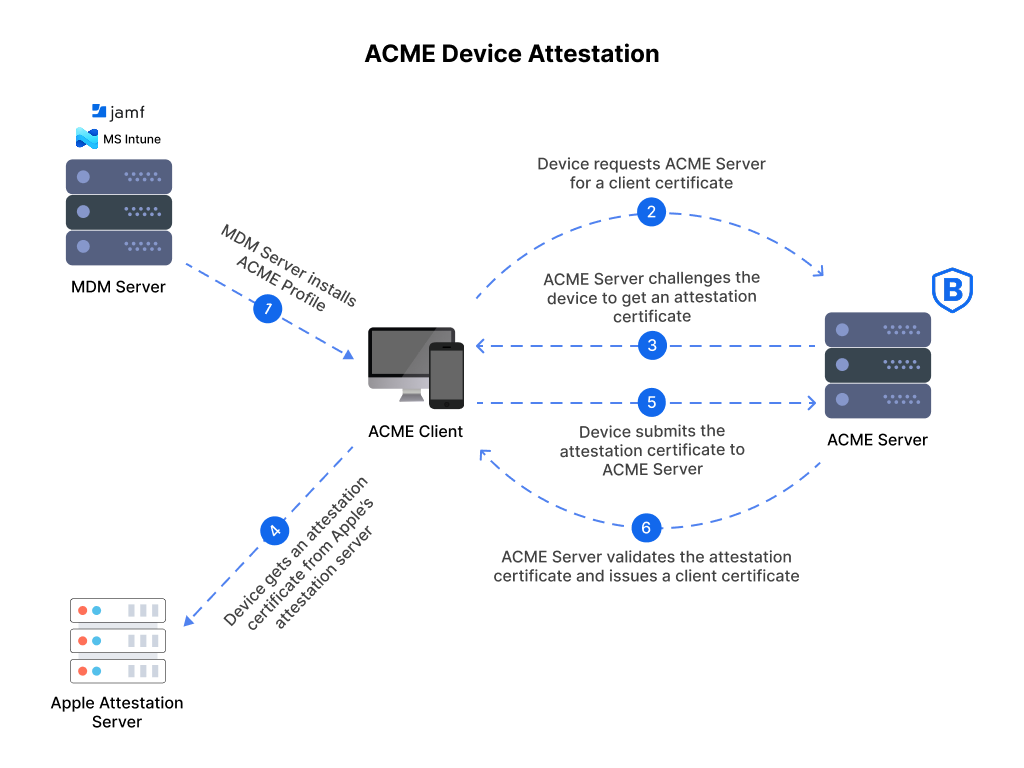
Table of Content
In today’s dynamic threat landscape, the traditional password-centric security model is crumbling under the weight of phishing attacks, credential stuffing, and ever-more sophisticated social engineering.
Enterprises are grappling with the challenge of providing secure, seamless access to critical resources like VPNs and Wi-Fi, not just for users, but for the devices they use.
How do you truly trust a device connecting to your network?
How do you ensure it hasn’t been tampered with, jailbroken, or compromised, potentially becoming a Trojan horse into your corporate infrastructure?
This is where Mobile Device Attestation (MDA) emerges as a game-changer. And today, we are incredibly excited to announce a monumental leap forward in enterprise security:
BastionXP CA’s ACME server now fully supports the draft-ietf-acme-device-attest-01, enabling unparalleled, automated, and robust device-centric authentication for your VPN and Wi-Fi networks!
This isn’t just an incremental update; it’s a paradigm shift.
We’re moving beyond mere user authentication to a world where the device itself becomes a critical, verifiable component of your security posture.
With BastionXP CA, you can now implement a zero-trust architecture where every device requesting access is cryptographically verified for its integrity and trustworthiness, all managed with unprecedented automation and the power of short-lived, frequently renewed certificates.
In this article, we’ll demystify Mobile Device Attestation, walk you through its core principles, and demonstrate exactly how BastionXP CA empowers you to build an impenetrable security perimeter for WiFi and VPN access usecases, while simultaneously enhancing the user experience.
The Problem: Why Passwords and Basic MDM Aren’t Enough
Let’s start by acknowledging the pain points.
You’re likely already using a VPN for remote access and WPA2-Enterprise or WPA3 for secure Wi-Fi. You might even have a Mobile Device Management (MDM) solution (like Jamf, Intune) in place to push configurations, manage applications, and enforce basic security policies. These are essential tools, but they have inherent limitations when it comes to truly “trusting” a device.
- Passwords are Flawed: We’ve said it before, and we’ll say it again: passwords are the weakest link. They can be stolen, guessed, phished, or simply forgotten, leading to costly breaches.
- User-Centric vs. Device-Centric: Most authentication focuses on who the user is. While crucial, it overlooks the critical question of what device they are using. A legitimate user on a compromised device is still a massive security risk.
- MDM Limitations: While MDM solutions offer control, they often rely on software-based checks that can be bypassed by sophisticated attackers, especially on rooted or jailbroken devices. They might enforce a passcode or encrypt the device, but they typically don’t provide a cryptographically verifiable proof of the device’s original, untampered state.
- The “Bring Your Own Device” (BYOD) Headache: With BYOD, managing device security becomes even more complex. How do you onboard personal devices securely without intruding too much on user privacy, while still ensuring they meet corporate security standards?
- Static Certificates and Manual Management: If you’re using EAP-TLS with traditional certificates, you’re likely dealing with certificates that have long lifespans (1-2 years) and manual renewal processes. This creates a larger window for compromise if a private key is stolen, and the operational overhead can be significant.
- Lack of Continuous Assurance: Current methods provide a point-in-time check. What happens if a device is compromised after it has been initially authenticated and granted access?
These challenges highlight the need for a more robust, dynamic, and automated approach to device security. This is precisely the void that Mobile Device Attestation, particularly on platforms like Apple devices, fills with unparalleled efficacy.
What is Mobile Device Attestation? A Deep Dive
At its core, Mobile Device Attestation(MDA) is a cryptographic process that allows a device to prove its genuine and untampered state to a relying party (like your RADIUS server). It leverages specialized hardware security features built into modern mobile devices, particularly Apple’s Secure Enclave, to generate verifiable cryptographic proofs.
Think of it like a digital birth certificate for your device, but one that can be continuously verified. When a device attests, it’s essentially saying:
“I am a genuine device from manufacturer X, model Y, with specific hardware security features. I am running software version Z, and my boot process has not been tampered with. Here’s cryptographic proof of all of this, signed by my unique, hardware-rooted identity.”
Let’s break down the key components and concepts, focusing on how Apple devices facilitate this:
1. Hardware-Rooted Trust: The Secure Enclave Processor (SEP)
Apple devices, from iPhones to iPads and Macs with Apple Silicon, incorporate a dedicated, isolated hardware component called the Secure Enclave Processor (SEP). This is not just a software feature; it’s a physically separate, highly secure co-processor that handles all cryptographic operations.
- Isolation: The SEP operates independently from the main application processor (AP). Even if the AP is compromised, the SEP remains secure.
- Unique Identity: Each SEP has a unique, cryptographically strong identity, fused during manufacturing. This identity is the foundation of trust.
- Key Generation and Storage: The SEP is responsible for generating and storing cryptographic keys (including private keys for attestation and client certificates) in a way that makes them fundamentally unexportable. You cannot extract these keys from the SEP, even with physical access to the device. This is a critical security advantage.
- Cryptographic Operations: All sensitive cryptographic operations – key generation, signing, encryption, decryption – happen within the SEP. The application processor merely requests these operations, but never has direct access to the private keys.
2. Cryptographic Attestation and Certificates
When we talk about “attestation,” we’re talking about a process where the device uses its Secure Enclave to generate a signed statement (an attestation certificate or attestation statement) containing verifiable information about its current state.
- Attestation Certificate/Statement: This is a cryptographically signed piece of data that includes details about the device’s hardware, operating system version, boot integrity, and potentially other relevant security properties. It also includes a public key that belongs to the device. The private key used to sign this statement is securely held within the device’s Secure Enclave and is unique to that device.
- Platform-Specific Roots of Trust: Apple’s attestation mechanism relies on a chain of trust that originates from Apple’s own roots. When a device attests, it provides evidence signed by its Secure Enclave, which can then be validated against Apple’s known attestation roots. This verifies the authenticity of the hardware and software stack.
- Public Key Cryptography: The attestation process fundamentally relies on public key cryptography. The device holds a private key (in its Secure Enclave) and sends a corresponding public key along with its attestation proof. A relying party can use this public key to verify that the proof was indeed signed by that specific device.
3. The ACME device-attest-01 Protocol
Definition: ACME Device Attestation is a security protocol extension (device-attest-01) that replaces shared passwords with hardware-backed cryptographic proof. BastionXP leverages this to ensure only company-owned mobile devices can access Wi-Fi and VPN.
The ACME “device-attest-01” protocol IETF draft is a standardized way for devices to perform this attestation and for relying parties to consume and verify it. It outlines the message formats, cryptographic primitives, and interaction flows for requesting and receiving attestation statements.
BastionXP CA’s support for device-attest-01 means that our CA is now equipped to:
- Request Attestation: Our system can initiate the attestation process with an Apple device.
- Receive Attestation Statements: We can correctly receive and parse the cryptographic attestation statements from the device.
- Validate Attestation: Crucially, BastionXP CA can then validate these statements against Apple’s roots of trust to ensure the device is genuine, untampered, and running an approved OS version.
- Issue Certificates Based on Attestation: Once the device’s integrity is verified through attestation, BastionXP CA can then issue a short-lived client certificate specifically bound to that attested device. This certificate’s private key is then securely generated and stored within the device’s Secure Enclave.
The BastionXP CA Solution: Automated, Attested, and Secure
Now that we understand the “what” of Mobile Device Attestation, let’s dive into the “how” with BastionXP CA.
Our solution leverages the device-attest-01 protocol, Apple’s Secure Enclave, EAP-TLS, and your existing RADIUS server infrastructure to create an end-to-end automated security powerhouse for VPN and Wi-Fi access.
Core Principles of the BastionXP CA Solution:
- Hardware-Bound Identity: Every issued client certificate is cryptographically bound to a specific device’s Secure Enclave. The private key never leaves the hardware.
- Attestation-Verified Trust: Certificates are only issued after a successful device attestation, guaranteeing the authenticity and integrity of the connecting device.
- Short-Lived Certificates (SLCs): Our certificates have extremely short lifespans (e.g., 4 or 8 hours). This drastically reduces the window of exposure if a certificate is ever compromised.
- Automated Renewal (ACME-Powered): Using the power of ACME (Automated Certificate Management Environment), these short-lived certificates are automatically and seamlessly renewed without any user intervention, ensuring continuous access and minimizing operational overhead.
- Seamless EAP-TLS Integration: We integrate perfectly with your existing RADIUS server and EAP-TLS configurations for robust authentication.
- Granular Policy Enforcement: By linking certificates to device identity and user identity, you can enforce very granular access policies.
- Integrates with your MDM: We integrate with your favorite MDM to manage these devices and their profiles.
The Workflow: How a Device Gets Authenticated for VPN/Wi-Fi with BastionXP CA
Let’s trace the journey of an employee’s Apple device (iPhone, iPad, Mac) as it enrolls and subsequently accesses your corporate VPN or Wi-Fi network using BastionXP CA.
Phase 1: Initial Enrollment and Device Attestation (Administrator-Driven)
Administrator Configuration in BastionXP CA: As an IT administrator, you configure BastionXP CA to act as your private Certificate Authority. You also add the serial number of the devices for which client certificates should be issues. The admin will also configure and create a VPN or WiFi access device configuration profile (that includes the BastionXP CA Directory URL and other settings) using the BastionXP web portal. The admin will then download the profile from BastionXP and upload it to an MDM (such as Jamf or Intune). For a step-by-step walkthrough of this enrollment flow on iOS, see ACME certificate enrollment for iOS and iPadOS.
Download the Configuration Profiles to Devices:
- The admin uploads the WiFi or VPN access configuration profile to the MDM.
- THe admin pushes these configuration profiles to the devices in the MDM inventory.
- The configuration profiles will be installed on the devices.
- The user of the device uses these preconfigured WiFi and VPN profiles to connect to the corporate WiFi Access Point or the VPN server.
- Device Attestation Request:
- The BastionXP ACME server, upon receiving an ACME enrollment/registration request, initiates the
device-attest-01protocol with the Apple device. - The device’s Secure Enclave generates an attestation statement containing cryptographic proof of its authenticity, hardware ID, OS version, boot integrity, and other relevant security parameters. This statement also includes a public key for the device.
- The device cryptographically signs this attestation statement using a private key securely held within its Secure Enclave.
- The signed attestation statement is sent back to the BastionXP CA.
- Attestation Validation by BastionXP CA:
- BastionXP CA receives the attestation statement.
- It then rigorously validates the statement against Apple’s trusted roots of attestation, ensuring the device is genuine, untampered, and meets the configured security posture requirements.
- If the attestation fails (e.g., device is jailbroken, OS version is too old, statement is invalid), the enrollment process is immediately terminated.
- Client Certificate Issuance (SLC):
- If attestation is successful, BastionXP CA, as your private CA, generates a new, unique client certificate (with a short lifespan, e.g., 4 or 8 hours, as per the configuration).
- The private key for this client certificate is generated directly within the device’s Secure Enclave and never leaves it. Only the public key is sent to the CA for inclusion in the certificate.
- BastionXP CA signs this certificate and returns it to the device.
- The client certificate, along with its Secure Enclave-protected private key, is then securely installed on the device (e.g., in the iOS/macOS keychain).
- Configuration Profile Deployment: BastionXP CA can also generate a configuration profile to automatically configuring the VPN and/or Wi-Fi settings to use EAP-TLS with the newly issued client certificate. This config profile can be later pushed to the devices using an MDM. This is critical for seamless user experience.
Phase 2: Ongoing VPN/Wi-Fi Access Authentication (Automated)
- Device Connects to VPN/Wi-Fi: When the employee attempts to connect to the corporate VPN or Wi-Fi network:
- The device initiates an EAP-TLS handshake with your RADIUS server.
- It presents the short-lived client certificate issued by BastionXP CA.
- The private key for this certificate is used by the Secure Enclave to perform the cryptographic operations required for TLS authentication.
- RADIUS Server Authentication:
- Your RADIUS server is configured to accept EAP-TLS authentication.
- Your RADIUS server receives the client certificate.
- It checks the certificate’s validity (e.g., expiry date, revocation status) and verifies the certificate chain, trusting BastionXP CA as the issuing authority.
- Crucially, the RADIUS server can be configured to leverage attributes within the certificate (e.g., User Principal Name, Device ID) to perform authorization against your identity provider (e.g., Active Directory, LDAP, Okta).
- Access Granted/Denied: Based on the successful EAP-TLS authentication and any configured authorization policies on the RADIUS server, the device is granted or denied access to the VPN or Wi-Fi network.
Phase 3: Automated Certificate Renewal (Zero-Touch)
This is where the power of BastionXP CA’s automation truly shines, especially with short-lived certificates.
Pre-Expiry Renewal Request: Before the short-lived client certificate expires (e.g., 2 hours before its 8-hour lifespan ends), the ACME client on the device (or the underlying OS ACME client) automatically initiates a renewal request to the BastionXP CA’s ACME server. While macOS supports native automatic renewal for device-level certificates, for a truly seamless mobile experience, BastionXP works with your MDM to automate the renewal trigger. When the certificate nears expiration, the MDM initiates a fresh ACME attestation flow, ensuring the device is still compliant and the hardware is still genuine before BastionXP issues a new certificate.
Re-Attestation (Optional but Recommended): For enhanced security, BastionXP CA can be configured to require a re-attestation during renewal. This means the device creates a new pair of keys and performs the
device-attest-01protocol again, proving its continued integrity. This provides continuous assurance that the device hasn’t been compromised since the last certificate issuance.New Certificate Issuance: If the (re)attestation is successful (and other policies are met), BastionXP CA issues a brand-new short-lived client certificate. Again, the private key for this new certificate is securely generated within the device’s Secure Enclave.
Seamless Update: The new certificate is automatically installed on the device, replacing the expiring one. Because this happens in the background, the user experiences no interruption to their VPN or Wi-Fi connectivity.
This continuous cycle of attestation, issuance of short-lived certificates, and automated renewal ensures that every device connecting to your network is always cryptographically verified, trustworthy, and operating with a fresh, uncompromised identity.
Why Short-Lived Certificates and ACME Automation are Critical
The combination of Mobile Device Attestation with short-lived certificates (SLCs) and ACME-powered automation is not just a convenience; it’s a fundamental security enhancement.
Benefits of Short-Lived Certificates (SLCs):
- Reduced Attack Surface: A certificate valid for only 4 or 8 hours has a drastically smaller window of vulnerability compared to a 1-2 year certificate. If a private key is ever compromised (highly unlikely with Secure Enclave, but theoretically possible), its utility to an attacker is severely limited. For the full financial case behind short-lived certificates, see the ROI of switching from SCEP to ACME Device Attestation.
- Faster Revocation: While the need for revocation is minimized with SLCs, if a device is lost, stolen, or deeply compromised, you only need to revoke the current short-lived certificate. The impact is minimal, as it would expire naturally very soon anyway.
- Enhanced Posture Enforcement: With frequent renewals, you can continuously re-evaluate the device’s security posture. If your policy changes (e.g., minimum OS version updated, a new jailbreak signature is detected), the device will fail its next attestation/renewal and lose access until it complies. This provides dynamic, continuous security.
- Mitigation of Key Compromise Risks: Even if a rogue insider could somehow exfiltrate a private key (again, incredibly difficult with SEP), its lifespan would be so short that it offers little value.
Benefits of ACME-Powered Automation:
- Zero-Touch Management: IT administrators no longer need to manually issue, deploy, or renew certificates. The entire lifecycle is automated, freeing up valuable time and resources.
- Seamless User Experience: Employees experience uninterrupted access. They don’t have to worry about “certificate expiring soon” warnings or manual renewal processes.
- Elimination of Human Error: Manual certificate management is prone to errors, such as misconfigurations, forgotten renewals, or incorrect deployments. Automation eliminates these risks.
- Scalability: As your organization grows and the number of devices increases, automated certificate management scales effortlessly, unlike manual processes.
- Policy Enforcement at Scale: ACME allows you to apply consistent certificate issuance and renewal policies across your entire device fleet.
Advantages of BastionXP CA with Device Attestation
- Zero-Trust Foundation: Establishes a true zero-trust model where every device must prove its trustworthiness before gaining access.
- Phishing Resistance: Eliminates password-based vulnerabilities, making phishing attacks largely ineffective for gaining network access.
- Enhanced Security Posture: Ensures only genuine, untampered, and policy-compliant devices connect to your network.
- Proactive Threat Mitigation: Continuously verifies device integrity, allowing for rapid detection and isolation of compromised devices.
- Automated Lifecycle Management: Frees up IT resources by completely automating certificate issuance, renewal, and revocation.
- Seamless User Experience: Provides continuous, uninterrupted access for users without requiring manual intervention for certificate management.
- Reduced Operational Overhead: Dramatically simplifies certificate management compared to traditional, long-lived certificates.
- Granular Access Control: Enables highly specific authorization policies based on verified device and user identities.
- Compliance Ready: Helps meet stringent compliance requirements by providing verifiable proof of device integrity and strong authentication.
- Scalability: Designed to scale effortlessly with your growing device fleet.
Addressing Common Questions for the IT Admin
Q: Does this replace MDM? A: Not entirely, but it significantly enhances MDM’s security capabilities. MDM is still valuable for pushing applications, managing settings, and enforcing basic policies. However, attestation provides a cryptographic proof of device integrity that MDM alone cannot offer. BastionXP CA can integrate with MDM solutions to simplify profile deployment and client installation.
Q: What about non-Apple devices?
A: The device-attest-01 protocol is specifically designed for Apple’s attestation mechanisms leveraging the Secure Enclave. While other platforms have similar hardware security modules (e.g., TPMs on Windows), the attestation flow and verification methods differ. BastionXP CA is committed to expanding its attestation support to other platforms as standardized protocols emerge.
Q: How do I manage exceptions or specific device types? A: BastionXP CA’s flexible policy engine allows you to define different enrollment and attestation policies for various user groups or device types. For instance, you could have stricter requirements for corporate-owned devices versus BYOD.
Q: What happens if a device loses internet connectivity and can’t renew its certificate? A: The short-lived certificate’s design means that the device must be able to reach the BastionXP CA’s ACME server for renewal. For devices with intermittent connectivity, you might configure slightly longer certificate lifespans (e.g., 24 hours instead of 4), though this is a trade-off with security. Robust network design and ensuring devices can reach the ACME endpoint are key.
Q: Is this complex to set up? A: BastionXP CA is designed for ease of deployment and management. While the underlying technology is sophisticated, our platform abstracts away much of the complexity, providing intuitive interfaces for configuration, policy management, and monitoring. Our documentation and support resources will guide you through every step.
The Future of Enterprise Security is Here
The threat landscape is constantly evolving, and your security solutions must evolve faster. Relying on outdated authentication methods is an invitation to disaster. With BastionXP CA’s groundbreaking support for device-attest-01, you’re not just implementing a new technology; you’re fundamentally transforming your security posture. You’re moving from a reactive, perimeter-based approach to a proactive, identity- and device-centric zero-trust model.
BastionXP CA empowers you to:
- Trust the device, not just the user.
- Automate your entire certificate lifecycle.
- Protect your VPN and Wi-Fi networks with unparalleled cryptographic assurance.
- Reduce operational burden and eliminate human error.
- Provide a seamless, secure experience for your employees.
Stop wrestling with passwords and static certificates. Embrace the future of enterprise security with BastionXP CA. Secure your organization, protect your data, and empower your workforce with the confidence that every connection is built on a foundation of undeniable trust.
For a full overview of how ACME Device Attestation works and what your team gains from day one, see the BastionXP ACME Device Attestation solution page.
Ready to experience the power of Mobile Device Attestation and automated certificate management? Try BastionXP CA for Free
About BastionXP
BastionXP is a cloud-native private PKI CA and device identity management platform that eliminates passwords and shared secrets by issuing hardware-attested certificates to mobile devices and laptops. Secure access to your Wi-Fi, VPN, and SaaS applications in your enterprise network. Replace legacy SCEP with automated ACME Device Attestation. No shared secrets. Zero credential theft. Learn more about BastionXP →